
A payment processing system is the technology that lets you accept electronic payments from customers (around the world). It’s what makes it possible for travellers to enter their credit card on your website, confirm bookings online, and send tour payments to your bank account.
Three key pieces work together to make this happen:
- Payment gateways that securely collect customer payment information. This is the form on your website where customers enter their card details, or the connection between your booking software and the payment system.
- Payment processors that handle the behind-the-scenes work — talking to banks, authorising transactions, and actually moving money from a customer’s account to yours.
- Merchant accounts are specialised bank accounts that temporarily hold funds from customer transactions before transferring them to your primary business account.
Think of it this way: the gateway is the front door where customers enter their payment info, the processor is the back office that moves the money, and the merchant account is the holding area before funds land in your regular bank account.
The good news is that many online payment solutions bundle all of these pieces together, so set-up is pretty straightforward, and you don’t have to purchase or manage these things separately. And if you’re using booking software like Bókun, a lot of the complexity is already handled for you.
Let’s talk about what you need to know to get started here.
Why online payment processing matters for tour operators
The simple fact is that you need online payment solutions to scale. If you want to grow your tour business past a certain point, manual payment processing just doesn’t cut it.
The majority of today’s travellers want to book and confirm plans online — and they can’t do that unless they can complete checkout with you. If they can’t pay instantly, you risk losing those customers to competitors who offer that modern-day convenience.
Here’s how online travel payment solutions make tour operators’ lives easier:
- You can accept bookings 24/7. Customers can book and pay at 2 am if they want to. You’re not limited to in-person payments or only collecting payments when you’re available during business hours.
- You save time on payment management & keep a history of all transactions. Online payment systems automate all your payments and maintain a digital trail, making it easy to reference past transactions. If you’re handling everything manually, you’re spending hours reconciling cash and checks, with no easy way to track where your money came from or to match payments to specific bookings.
- You get paid faster and improve cash flow. Payouts typically hit your account in 1 to 3 business days (vs. waiting for checks to clear or chasing down bank transfers).
- Online payments reduce no-shows. When customers pay upfront — or even just put down a deposit — they’re far more likely to actually show up. “I’ll pay when I get there” bookings have a much higher cancellation rate.
- You can reach international travellers. You can accept global payments, in different currencies, from customers around the world — without the headache of international wire transfers or calculating currency conversions.
- You can offer payment flexibility. Give customers options like payment plans or buy now, pay later — which can make your travel experiences accessible to more audiences and help you earn bookings from customers you might otherwise never win.
- You can sell more per booking and increase average booking value (ABV). It’s easier to upsell add-ons, upgrades, or extras when customers can add them to their cart and pay for everything at once.
Payment methods that tour operators should accept
If you want to book as many travellers as possible, you need to offer flexibility in how they can pay online. Consider offering alternative payment methods beyond just credit cards. The more payment options you offer, the more bookings you’ll win.
These are the most common payment methods customers expect:
- Credit and debit cards: The baseline. If you can’t accept Visa, Mastercard, and American Express, you’ll lose bookings. Most travellers still default to card payments.
- Digital wallets: Apple Pay, Google Pay, and Samsung Pay are becoming more popular, especially for mobile bookings. They’re faster than entering card details manually, and customers trust them for security.
- Bank transfers: In some markets, bank transfers are the preferred payment method. They’re also useful for pricier experiences where customers prefer to pay directly from their bank account rather than charge a large amount to a credit card.
- Buy now, pay later (BNPL): Options like Klarna, Affirm, and Afterpay let customers split payments into instalments. As mentioned above, this can make expensive tours more accessible and help you capture bookings from travellers who want payment flexibility.
The payment solution you choose will determine which of these methods you can actually accept, so make sure your provider supports the options your customers want.
How to compare payment solutions
Not all popular payment platforms are great choices for tour operators — some charge higher fees for international transactions, others don’t support the payment methods your customers actually want to use, and many lack the multi-currency capabilities you need to serve travellers from around the world.
Here’s what to consider when comparing solutions:
Multi-currency support
Multi-currency support is absolutely essential to serve international travellers. You should be able to:
- Accept payments in different currencies. Your payment solution should let customers pay in their local currency. (Duh.)
- Display prices in the customer’s local currency. Beyond just accepting different currencies, you want the ability to display tour prices in the currency that makes sense for each customer so they don’t have to hassle with that mental math. Some solutions can automatically detect a visitor’s location and show prices accordingly.
It’s also a perk if your online payment solution can offer a fully localised experience and adapt the checkout flow to the customer’s language and location. Not just displaying prices in their currency, but also showing payment methods relevant to their region and using their preferred language.
You also need to understand foreign exchange (FX) fees and rates.
Every time you process a payment in a currency that’s different from your bank account’s currency, there’s a conversion involved — and that almost always comes with fees.
Payment processors handle FX differently. Some offer competitive rates, others mark up significantly. You should ask about FX rates when evaluating solutions and factor them into your decision, especially if you have many customers booking from outside your home country.
Security & compliance features
Your payment solution must meet industry security standards. You need:
- PCI-DSS compliance: Any legitimate payment processor should be PCI-DSS (Payment Card Industry Data Security Standard) compliant — this is the standard requirement for handling credit card information. If a provider isn’t PCI-DSS compliant, don’t use them.
- Fraud prevention tools: Look for built-in fraud-detection features such as address verification, CVV checks, and the ability to flag suspicious transactions. Some providers use machine learning to spot patterns that indicate fraud. The better your fraud prevention, the fewer chargebacks you’ll deal with down the line.
- 3D Secure authentication: This adds an extra layer of security for card-not-present transactions (which is what online bookings are classified as). Customers verify their identity through their bank before the payment goes through. It helps protect you from fraudulent transactions and disputes.
Payment methods
Make sure your payment solution supports the payment methods we discussed earlier — credit and debit cards, digital wallets, bank transfers, and BNPL options. Think about which methods are most important to your ideal audiences and make sure you offer a variety of options to appeal to all preferences.
Traveller checkout experience
You should aim to make the payment experience as simple as possible for travellers. Any roadblock they hit along the way = increased chance of them abandoning their cart.
You should look for solutions that offer:
- Mobile-friendly checkout. Most tour bookings happen on mobile devices now — so your payment pages need to load quickly, display correctly on smaller screens, and allow customers to (easily) enter payment info from their phones. If your mobile checkout experience is clunky or slow-loading, you’re almost guaranteed to lose bookings.
- The option for repeat customers to save payment info. Customers should be able to securely save their payment details so they can book again without re-entering everything. This is especially valuable if you have customers who book multiple tours or return each year.
- Guest checkout options. Don’t force people to create an account before they can pay. You can always nudge users to create accounts after the booking is complete.
Fees
Of course, payment processing solutions aren’t free. Providers charge (a variety of) fees for their services. So you have to do some digging to determine what costs to expect before committing to a solution.
Here are the most common types of fees to look out for:
- Setup fees: Some providers charge an upfront fee to set up your account.
- Monthly or subscription fees: Some payment solutions charge a flat monthly fee just to use their platform, regardless of how many bookings you process. Others don’t charge a monthly fee — only transaction fees.
- Transaction fees: This is the fee charged per individual booking — usually a percentage plus a flat amount (e.g., 2.9% + 30¢ per transaction). Compare rates across providers to determine what’s most cost-effective. Pay attention to whether they charge different rates for different card types or international transactions.
Think about your average booking volume when determining what type of fees (monthly vs. transaction) would make sense for you.
- Currency conversion fees: As mentioned above, there’s usually a fee to convert and process payments in different currencies. Consider your existing customer base and the markets you plan to expand into when evaluating these costs.
- Chargeback fees: When a customer disputes a transaction, you’ll typically be charged a fee (even if you win the dispute). Ask what the chargeback fee is and whether there are any tools included to help you prevent or manage disputes.
Reporting & reconciliation
Your online payment processing solution should allow you to track transactions easily, streamline reconciliation, and simplify bookkeeping. You should look for:
- Easy payment tracking: Can you see all your transactions in one place? Filter by date, booking type, payment method, or customer? The easier it is to find specific payments, the less time you’ll waste digging through records.
- Integrations and reconciliation with your accounting software: Check whether the payment solution connects with the accounting software you use (e.g., QuickBooks, Xero). Automatic syncing saves hours of manual data entry and reduces the errors that come along with that.
- Refund management: You’ll need to process refunds for cancellations or changes. Make sure the platform makes this straightforward — ideally with the ability to process full or partial refunds without a dozen and one steps.
Customer support
Lastly, any high-quality payment processing provider should offer reliable support when you encounter issues such as failed payments, disputes, or chargebacks. You should think about:
- Response times when things go wrong. If a payment fails during peak booking season or a customer disputes a charge, how quickly can you get support? Look for providers that offer multiple support channels (email, chat, phone) and check their actual response times.
- The tools or guidance offered to help you manage issues when they arise. For example, some solutions include chargeback protection or assistance with gathering evidence to fight fraudulent disputes.
It’s also helpful to read reviews of the solutions you’re considering to get the scoop from real customer experiences.
Common payment processors for tour operators
Below are the payment processors commonly used by tour operators and travel businesses.
Now, it’s important to note: you’re not limited to just one — many operators use a combination of solutions for different needs (e.g., online bookings vs. in-person payments, or across various geographic markets).
Each option here has different strengths, so choose based on your specific audiences and business needs.
- Stripe: One of the most popular payment processors globally, known for its ease of use and multi-currency tools (supporting 135+ currencies). Good all-around choice for tour operators who want flexibility and don’t need much hand-holding with setup.
- Square: Best known for in-person payments with their physical card readers, but also offers online payment processing. Great option if you need both — taking payments at a check-in kiosk and processing online bookings.
- PayPal: Widely recognised and trusted by customers worldwide. Offers both online checkout and in-person payment options, plus owns Braintree for more advanced needs.
- Braintree (aka PayPal Enterprise Payments): PayPal’s solution for businesses that need more customisation and control than standard PayPal offers. Strong support for digital wallets and international payments.
- Rapyd: Built specifically for cross-border payments with strong support for local payment methods in different countries. Good choice if you’re targeting multiple international markets.
- Worldpay: Enterprise-level processor that handles high transaction volumes and offers extensive global coverage. Better suited for established tour operators processing significant volume.
- Adyen: Popular in travel and hospitality, designed to handle complex international transactions and high-volume sales. Offers unified commerce across online and in-person channels.
- Checkout.com: Fast-growing processor with competitive rates and strong fraud prevention tools. Good balance of features and pricing for mid-sized tour operators.
- Authorize.net: Long-established processor (founded in 1996) with straightforward setup and reliable service. Solid choice for operators who want something proven and uncomplicated.
Getting started with online payment processing
After you’ve evaluated your options, it’s time to choose your solution(s) and get set up. Here’s what that process typically looks like:
- Choose your payment solution based on the factors we covered above — multi-currency support, fees, payment methods, etc. — and select the provider(s) that make the most sense for your business.
- Next, you’ll need to create an account and submit information about your business. This usually includes your business registration details, tax ID, bank account information, and sometimes proof of your tour operator licence or insurance. The approval process can take anywhere from a few hours to a couple of days, depending on the provider.
- Then you can integrate with your booking platform. If you’re using booking software like Bókun, this step is straightforward, as we offer built-in integrations with most major payment processors. If your booking system doesn’t include this functionality or you’re building a custom solution, you’ll need to work with a developer to integrate the payment provider’s API with your system.
- After setting up integrations, you should run several test transactions to ensure that payments process correctly, refunds work as expected, and everything flows smoothly from booking to payment confirmation. Most providers offer a test mode specifically for this.
- Once testing is complete and you know everything works as it should, you can switch to live mode and start accepting real payments.
How Bókun supports online payments
Bókun integrates with dozens of online payment processing tools, allowing you to offer a variety of payment options for customers and serve international audiences.
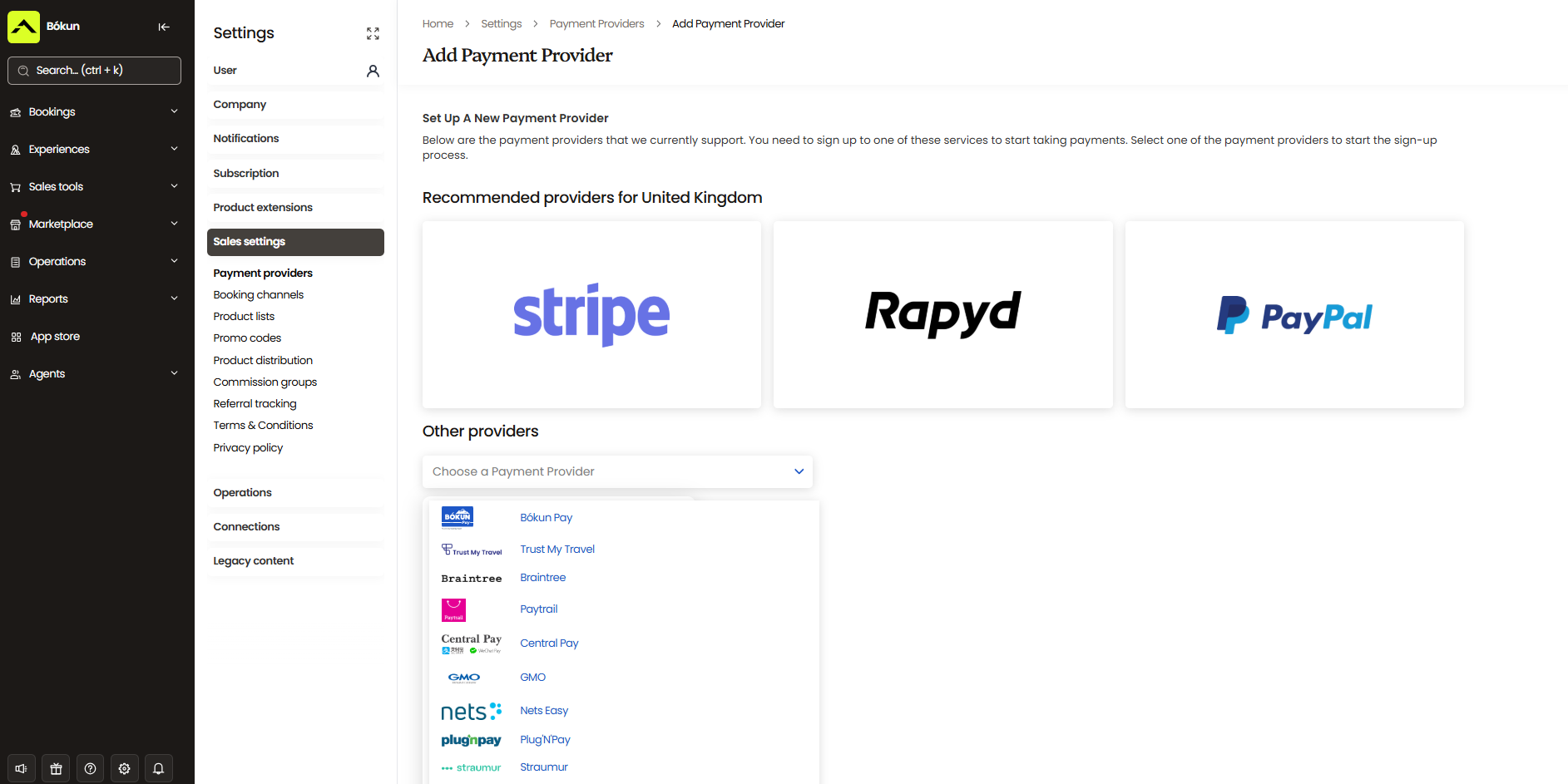
When you use Bókun, you get:
- Built-in integrations with major payment providers. We integrate with Stripe, PayPal, Rapyd, Klarna, Clearpay, Trust My Travel, Alipay, BLIK, Afterpay, and more. You can connect your preferred payment processor (or multiple processors) through Bókun’s dashboard with just a couple of clicks — then you’re ready to accept payments.
- Multi-currency support and flexible payment options. Let customers pay in their local currency using credit cards, debit cards, or digital wallets like Apple Pay and Google Pay — all processing in real-time. We also support BNPL options via Klarna.
- In-person payment options. Beyond online bookings, Bókun’s point-of-sale (POS) integration with Stripe lets you take payments at ticket counters, kiosks, or on the go with Tap to Pay on mobile devices.
- Payment links for direct bookings. When customers contact you via phone, email, or social media, you can easily create a secure payment link that sends them straight to checkout. The transaction is automatically logged in our system, and their bookings appear in your Bókun booking calendar — no manual updates on your end.
- Automatic syncing across all channels. Payments process instantly and sync with your bookings, so your records stay accurate without manual updates.
Bókun handles the hard stuff for you — you don’t have to hassle with complex integrations or managing payments manually. You can focus on what you care about most: running five-star tours.
See how Bókun’s all-in-one tour operator software helps you manage all areas of your business, save time on back-office processes, and accelerate growth by starting a 14-day free trial today!
Related reads: